Claude Cowork · Week 2 · Lesson 8
Dispatch — Your AI From Anywhere
Cowork is powerful when you're at your desk. Dispatch makes it useful everywhere else.
With Dispatch, you send a task from your phone and your desktop handles it. By the time you sit back down, the work is done.
What Dispatch actually is
Dispatch is a persistent conversation thread that links your phone to your desktop Cowork session. Your phone is the remote control. Your desktop is where the work happens.
This is different from using the Claude mobile app normally. When you open Claude on your phone, you're in Chat mode — a separate conversation with no access to your files, connectors, or Skills. With Dispatch, your phone connects directly to the same Cowork session that has all of that context. It's the same Claude that knows your about-me.md, has Gmail connected, and has your Skills loaded.
The shift this creates: you stop sitting at your computer waiting for Claude to finish. You assign a task, put your phone down, and come back to finished work.
Setup: two minutes
Before pairing your phone, make sure Dispatch is enabled. Go to Settings → Cowork tab and confirm the Dispatch (Beta) toggle is on. The description reads: "Let Claude work on tasks from your phone using this computer. When off, your phone won't be able to dispatch work here."
Then:
- Open Cowork on your desktop
- Click Dispatch in the left sidebar
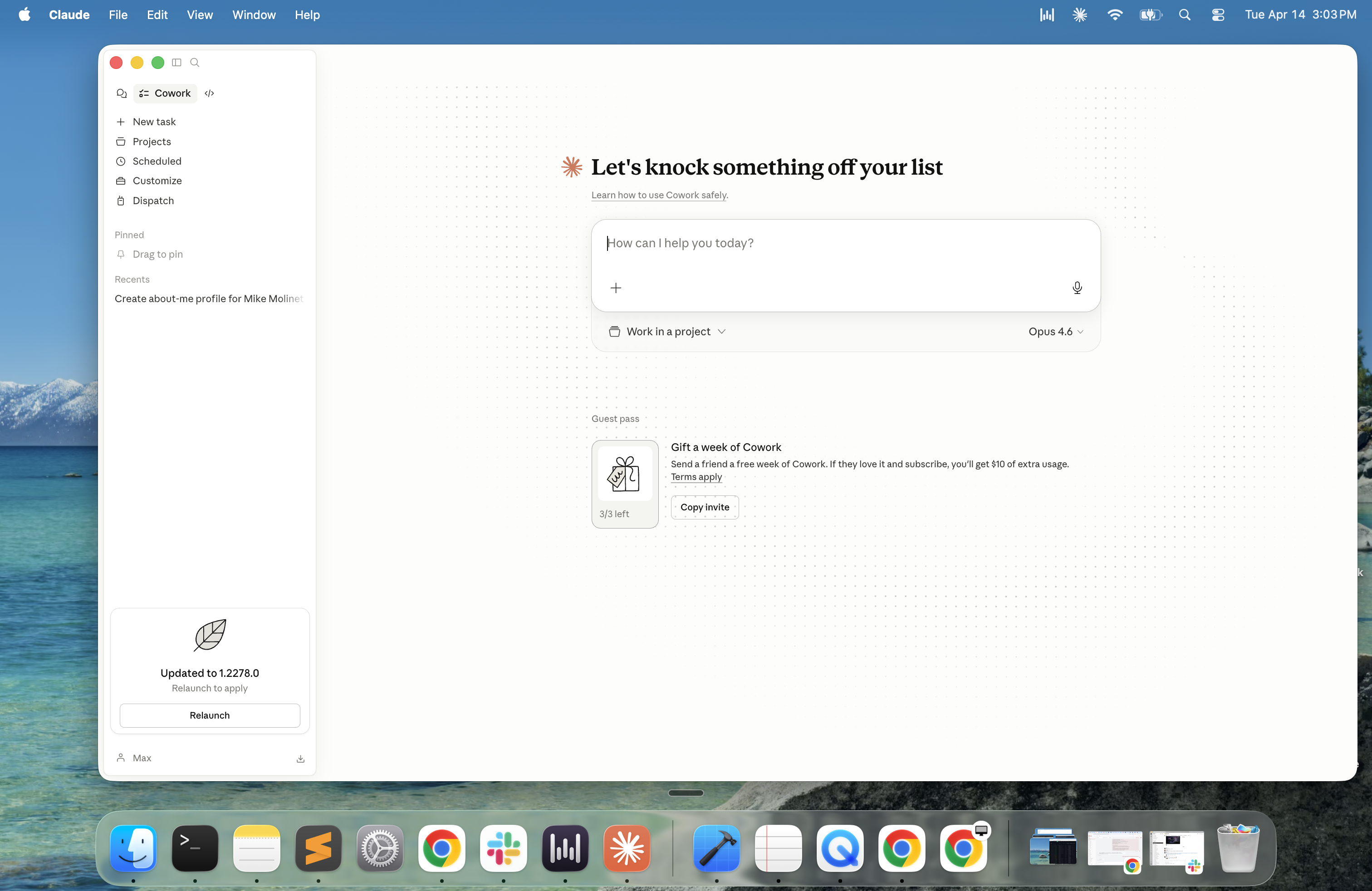
- Click Get started
- On the next screen, toggle on Give Claude access to your files and Keep your computer awake — both are important
- A QR code will appear on your desktop — scan it with your phone's Claude app to complete the pairing
- Open the Claude app on your phone and scan the QR code
- Your phone and desktop are now paired
That's it. The same conversation is now live on both devices. Send a message from your phone — it appears in Cowork on your desktop. Claude's response appears on both.
The keep-awake toggle matters
When you enable Dispatch, toggle on the option that keeps your computer awake. This prevents your machine from going to sleep mid-task when you've stepped away. Without it, you'll assign a task from your phone, walk away, and come back to find nothing happened because the laptop went to sleep.
Tasks that work well from your phone
Not everything is worth dispatching from your phone. The best candidates are tasks where you have context on the go that you want acted on before you return to your desk.
Pull the three most recent files from my OUTPUTS folder and
give me a brief summary of each. Send it back to my phone.
Check my Gmail for anything urgent that came in the last
two hours. Flag anything that needs same-day response.I just had a meeting with [name] about [topic]. Draft a
follow-up email based on these notes: [paste your notes].
Save the draft to OUTPUTS and show me a preview.Look at my weekly-priorities file and tell me what's still
open from this week. I want to review before tomorrow.The pattern: quick context from you, meaningful output ready when you return.
The memory advantage
Dispatch has a persistent thread — unlike standalone Cowork sessions, it remembers context across sessions. This means Claude learns how you work over time through Dispatch in a way that standalone sessions don't support.
If you want Cowork to feel like it genuinely knows you and your patterns, using Dispatch consistently is part of how that compounds. The persistent thread is your ongoing working relationship with Claude.
One caveat: Anthropic hasn't fully documented how very long Dispatch threads behave over weeks of heavy use. If tasks start feeling less precise or Claude seems to be losing context, it may be worth starting a fresh Dispatch thread. Think of it like clearing a very long email chain — sometimes a clean start is more effective than continuing to build on accumulated history.
What Dispatch is not
Dispatch is not cloud computing. Your desktop has to be awake and Claude Desktop has to be open. If your machine sleeps or the app closes, Dispatch stops. Nothing runs in the cloud on your behalf — everything happens locally on your computer, with your phone as the trigger.
Think of it as a remote control, not a cloud service.
This is actually a feature for some people: it means your files never leave your machine, and nothing runs without your computer being available to you.
Availability and status
Dispatch is available on Pro and Max plans. Team and Enterprise availability was not confirmed at the time of this writing — check the release notes for updates.
As of April 2026, Dispatch is in research preview — the core functionality is solid, but expect improvements to reliability and features as Anthropic continues development.
A note for builders
If you use Claude Code alongside Cowork, Dispatch works in Claude Code too. You can send coding tasks from your phone and have Claude Code execute them on your desktop — the same remote control model, applied to development work.
Next: computer use. What happens when Cowork doesn't have a connector for something — and what it does instead.