Claude Cowork · Week 1 · Lesson 4
Build Your Workspace — Context Files
Right now, every time you start a Cowork session, Claude starts fresh. It doesn't know your name, your role, your standards, or how you like things done. It does good work — but it's doing good work for a generic professional, not specifically for you.
Context files fix this. They're plain markdown files that sit in a folder Cowork reads before every task. Once they're in place, Claude understands who you are, what you're working on, and what good output looks like for you — without you having to explain it every time.
This is the highest-leverage setup in this entire course. Two hours now saves time on every single task going forward.
The three files worth building
You need three files. Each one does a different job.
about-me.md — Who you are and how you work. Your role, what you're focused on right now, how you like to communicate, what good work looks like to you, what frustrates you.
my-company.md — Your organization's context. Goals, current priorities, what matters this quarter, key people and their roles, any terminology or acronyms Claude should know.
anti-ai-writing-style.md — Your writing rules. Specifically, what you'd never say, what sounds wrong, what patterns you want Claude to avoid. This one is more important than it sounds — we'll explain why in a moment.
These files aren't official Anthropic products — they're a framework that practitioners have found genuinely works. Think of them as your onboarding document for Claude.
The counterintuitive principle: 80% is what you're not
When most people write a voice or style file, they describe what they want: "Write clearly and concisely. Use a professional but warm tone. Be direct."
That doesn't work well. Those descriptions are too vague and too positive — they could apply to almost anyone.
What works much better is constraints. Refusals. The specific things you'd never say.
Your anti-ai-writing-style.md file should be overwhelmingly composed of don'ts, not dos. Here's why: constraints are more enforceable than aspirations. "Don't start with 'In today's fast-paced world'" is something Claude can check for and comply with precisely. "Write with warmth" is not.
Some examples of what belongs in this file:
- Never start with: "In today's fast-paced world," "It's no secret that," "Now more than ever"
- Never use: utilize, leverage, synergy, robust, seamless, cutting-edge, game-changing, empower, dive into, delve into
- No paragraphs longer than 3 sentences
- No bullet points unless the content is genuinely a list
- No throat-clearing — don't explain what you're about to say, just say it
- No hedging phrases: "I think," "perhaps," "it could be argued"
The more specific your don'ts, the more your output will sound like you and less like generic AI.
The folder structure that works
Before you run the interview, set up this folder structure in your Claude Workspace folder. The interview will save directly into it.
Claude Workspace/
├── ABOUT ME/
│   ├── about-me.md
│   ├── my-company.md
│   └── anti-ai-writing-style.md
├── OUTPUTS/
│   └── (Cowork saves deliverables here)
└── TEMPLATES/
    └── (any document templates you use regularly)
Create these folders now, then come back for the next step.
How to build your about-me.md
The blank page problem is real. Most people don't know where to start when asked to describe how they work.
The solution: let Claude interview you.
Paste this into Cowork:
I want to build my about-me.md context file. Interview me
to get the information you need.

Rules:
- Ask me ONE question at a time
- Wait for my answer before asking the next question
- If my answer is vague, ask one follow-up for something specific
- Ask 15-20 questions total

After the interview, compile my answers into a structured
markdown file called about-me.md with these sections:
- Who I Am
- How I Work Best
- My Standards
- What I Care About
- What Frustrates Me
- Working With Me

Keep the total file under 600 words. Use my exact words
where possible. Save it to my ABOUT ME folder when done.

Start with question 1 now.
Answer honestly and specifically. The more concrete your answers, the more useful the file will be. When Claude asks what frustrates you about deliverables, don't say "bad quality" — say what specifically looks wrong to you. That's the information that actually changes Claude's output.
The 6,000 token rule
One practical constraint worth knowing: Cowork reads your context files before every task, but if a file gets too long — roughly 6,000 tokens, or about 4,500 words — it may start summarizing rather than reading the full content.
This is a practitioner observation, not an officially documented limit — treat it as a useful guideline rather than a hard rule. The practical takeaway is the same either way: keep each file tight and specific. If your about-me.md is 300 words and your my-company.md is 400 words, Cowork reads every word of both. If either file balloons to 2,000 words, you start losing fidelity.
When in doubt, cut. Specificity beats length.
Setting up Global Instructions
In addition to context files, Cowork has a Global Instructions field in Settings. Think of this as the standing orders that apply to every single task — things like "always show me your plan before acting" or "save all deliverables to my OUTPUTS folder."
Find Global Instructions at: Settings → Cowork tab (in the left sidebar) → scroll to Global Instructions at the bottom → click Edit.
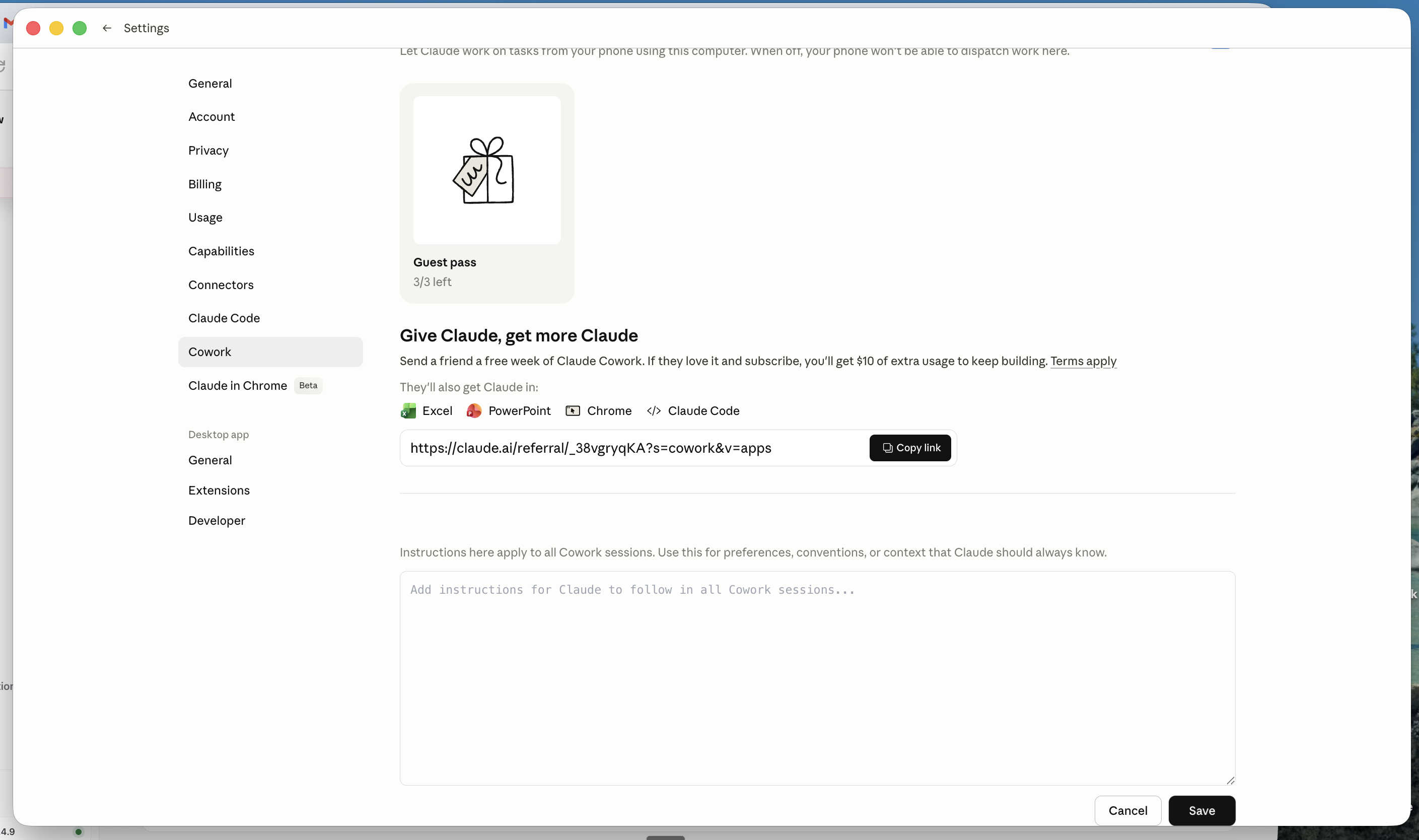
Note: "Cowork" here means the Cowork tab inside Settings — not the Cowork mode in the main app sidebar.
A minimal starting template:
Before every task, read the files in my ABOUT ME folder.

Always show me your plan before taking any action on files.
Save all deliverables to my OUTPUTS folder unless I say otherwise.
If a task is unclear, ask me one specific question before starting.
Do not delete any files without explicit permission.
Do not send emails or messages without showing me the draft first.
Keep Global Instructions short — under 200 words. This field is read every session. Dense instructions here slow things down and dilute the signal.
What changes after this
Once your context files are in place, the quality difference is immediate. Tasks that previously produced generic output will start producing work that sounds like you, reflects your standards, and doesn't require heavy editing.
You'll stop re-explaining yourself at the start of every session. Claude will know your context before you say a word.
The next lesson covers connectors — linking Cowork to the tools you already use, so it can pull from your actual email, calendar, and documents rather than just local files.